 printpipe.io
How to make Open Graph share images from HTML
The 1200 × 630 picture shown when someone shares your link, made from an HTML template with the post's title, author and colours.
screenshotstemplates
When a link is shared on LinkedIn, Slack, Facebook or X, the post shows a large picture: the Open Graph image. A good one gets more clicks than a plain logo, and it’s easy to make one per page: design it as HTML once, then take a screenshot with each page’s title.
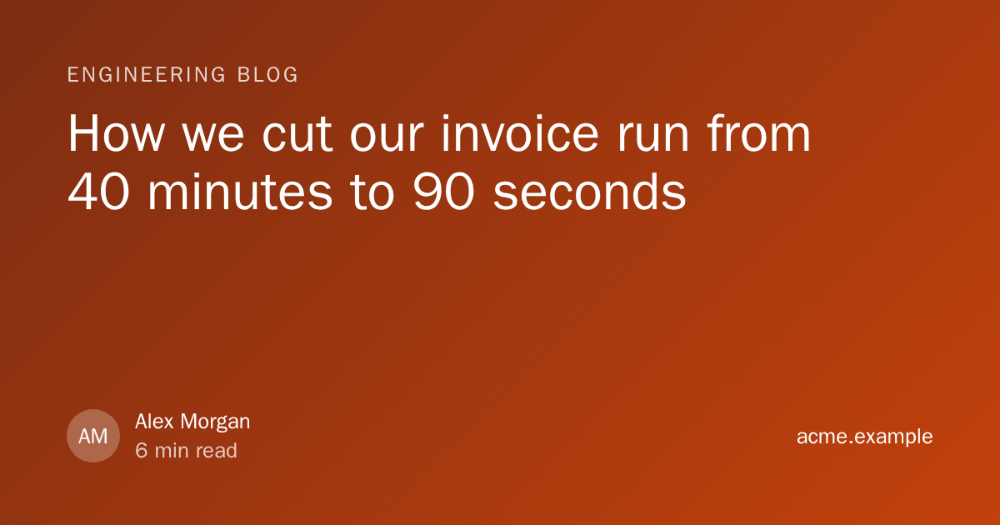
The request
Save the template once (Use this template opens it in your dashboard), then send its id and your data for each document:
curl https://api.printpipe.io/v1/generate \
  -H "X-API-Key: $API_KEY" \
  -H "Content-Type: application/json" \
  -d '{
  "templateId": "YOUR_TEMPLATE_ID",
  "data": {
    "kicker": "Engineering blog",
    "title": "How we cut our invoice run from 40 minutes to 90 seconds",
    "author": { "name": "Alex Morgan", "initials": "AM" },
    "readingTime": "6 min read",
    "site": "acme.example",
    "colors": { "from": "#7c2d12", "to": "#c2410c" }
  },
  "output": "png",
  "fullPage": false
}' \
--output image.pngimport { writeFile } from 'node:fs/promises';
const res = await fetch('https://api.printpipe.io/v1/generate', {
method: 'POST',
headers: { 'X-API-Key': process.env.API_KEY, 'Content-Type': 'application/json' },
body: JSON.stringify({
"templateId": "YOUR_TEMPLATE_ID",
"data": {
"kicker": "Engineering blog",
"title": "How we cut our invoice run from 40 minutes to 90 seconds",
"author": { "name": "Alex Morgan", "initials": "AM" },
"readingTime": "6 min read",
"site": "acme.example",
"colors": { "from": "#7c2d12", "to": "#c2410c" }
},
"output": "png",
"fullPage": false
}),
});
if (!res.ok) throw new Error((await res.json()).message);
await writeFile('image.png', Buffer.from(await res.arrayBuffer()));import os, requests
res = requests.post(
"https://api.printpipe.io/v1/generate",
headers={"X-API-Key": os.environ["API_KEY"]},
json={
"templateId": "YOUR_TEMPLATE_ID",
"data": {
"kicker": "Engineering blog",
"title": "How we cut our invoice run from 40 minutes to 90 seconds",
"author": { "name": "Alex Morgan", "initials": "AM" },
"readingTime": "6 min read",
"site": "acme.example",
"colors": { "from": "#7c2d12", "to": "#c2410c" }
},
"output": "png",
"fullPage": False
},
timeout=60,
)
res.raise_for_status()
with open("image.png", "wb") as f:
f.write(res.content)A screenshot at exactly 1200 × 630
The template’s page settings set the browser window to 1200 × 630, the size the big platforms show. The request asks for a screenshot ("output": "png") of just that window ("fullPage": false), so the picture is exactly that size whatever the content.
For extra sharpness on high-resolution screens, add "scale": 2: the picture becomes 2400 × 1260 with the same layout. Platforms scale it down; it costs a little more file size.
Pictures with photos in the background are smaller as JPEG: "output": "jpeg" with "quality": 85.
Long titles
Titles vary. The template’s heading wraps over at most three lines and then ends with an ellipsis:
h1 { display: -webkit-box; -webkit-line-clamp: 3; -webkit-box-orient: vertical; overflow: hidden; }
Test it with your longest title. If titles are often long, lower the font size, or send a shorter title for the image than for the page.
Your fonts and logo
Use the same typeface as your site: a Google Fonts <link> or your own @font-face with an absolute URL. Fonts are loaded before the screenshot is taken. Logos and photos go in as absolute https URLs or data: URIs.
Make it once, not on every share
Platforms fetch the image when a link is first shared, and they don’t wait long. So don’t make it on request: make it when you publish the page, store the PNG with your other files, and point to it:
<meta property="og:image" content="https://your-site.example/og/how-we-cut-our-invoice-run.png">
<meta property="og:image:width" content="1200">
<meta property="og:image:height" content="630">
<meta name="twitter:card" content="summary_large_image">
An image like this is well under 1 MB, so it costs one credit. Make it again only when the title changes.
Before you go live
- Free plan images carry a small “Made with” line; paid plans don’t.
- Platforms cache images per URL for a long time. When you change one, give it a new file name.
- The platforms’ own link preview tools show what they will display.