 printpipe.io
How to make receipts as one long PDF page
Till receipts and order confirmations as a single page as long as the content, 80 or 58 mm wide, with prices lined up and a QR code for the order.
receiptstemplates
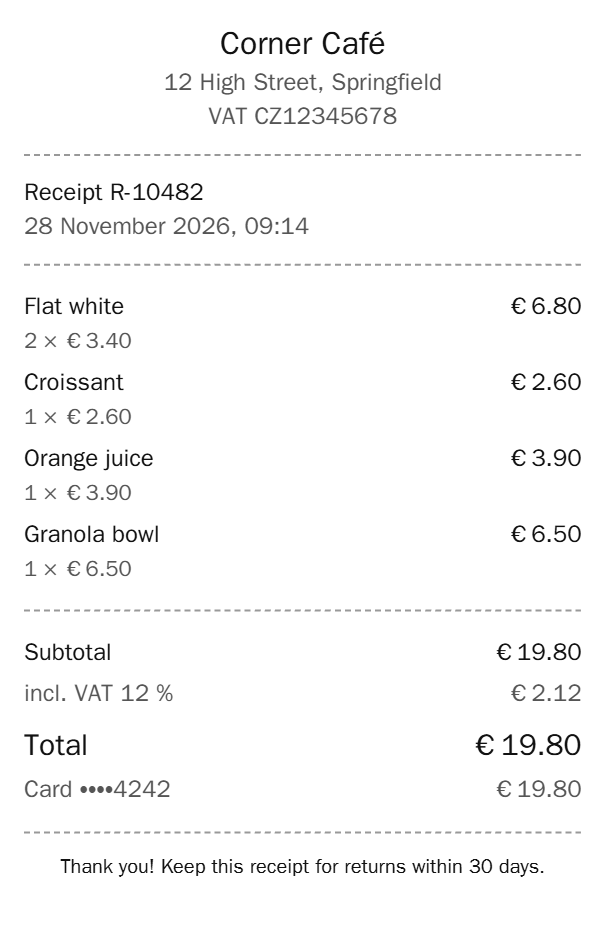
A receipt isn’t a letter. It’s a narrow strip as long as the purchase, and cutting it into A4 sheets wastes paper and splits the total from the items. With singlePage, the whole receipt becomes one page exactly as tall as its content, at the width of a till roll.
The request
Save the template once (Use this template opens it in your dashboard), then send its id and your data for each document:
curl https://api.printpipe.io/v1/generate \
  -H "X-API-Key: $API_KEY" \
  -H "Content-Type: application/json" \
  -d '{
  "templateId": "YOUR_TEMPLATE_ID",
  "data": {
    "shop": {
      "name": "Corner Café",
      "address": "12 High Street, Springfield",
      "vatId": "VAT CZ12345678"
    },
    "number": "R-10482",
    "date": "28 November 2026, 09:14",
    "items": [
      {
        "name": "Flat white",
        "qty": 2,
        "unitPrice": "€3.40",
        "price": "€6.80"
      },
      {
        "name": "Croissant",
        "qty": 1,
        "unitPrice": "€2.60",
        "price": "€2.60"
      },
      {
        "name": "Orange juice",
        "qty": 1,
        "unitPrice": "€3.90",
        "price": "€3.90"
      },
      {
        "name": "Granola bowl",
        "qty": 1,
        "unitPrice": "€6.50",
        "price": "€6.50"
      }
    ],
    "subtotal": "€19.80",
    "taxes": [{ "label": "incl. VAT 12 %", "amount": "€2.12" }],
    "total": "€19.80",
    "payment": "Card ••••4242",
    "paid": "€19.80",
    "footer": "Thank you! Keep this receipt for returns within 30 days."
  },
  "singlePage": true,
  "filename": "receipt-R-10482"
}' \
--output document.pdfimport { writeFile } from 'node:fs/promises';
const res = await fetch('https://api.printpipe.io/v1/generate', {
method: 'POST',
headers: { 'X-API-Key': process.env.API_KEY, 'Content-Type': 'application/json' },
body: JSON.stringify({
"templateId": "YOUR_TEMPLATE_ID",
"data": {
"shop": {
"name": "Corner Café",
"address": "12 High Street, Springfield",
"vatId": "VAT CZ12345678"
},
"number": "R-10482",
"date": "28 November 2026, 09:14",
"items": [
{
"name": "Flat white",
"qty": 2,
"unitPrice": "€3.40",
"price": "€6.80"
},
{
"name": "Croissant",
"qty": 1,
"unitPrice": "€2.60",
"price": "€2.60"
},
{
"name": "Orange juice",
"qty": 1,
"unitPrice": "€3.90",
"price": "€3.90"
},
{
"name": "Granola bowl",
"qty": 1,
"unitPrice": "€6.50",
"price": "€6.50"
}
],
"subtotal": "€19.80",
"taxes": [{ "label": "incl. VAT 12 %", "amount": "€2.12" }],
"total": "€19.80",
"payment": "Card ••••4242",
"paid": "€19.80",
"footer": "Thank you! Keep this receipt for returns within 30 days."
},
"singlePage": true,
"filename": "receipt-R-10482"
}),
});
if (!res.ok) throw new Error((await res.json()).message);
await writeFile('document.pdf', Buffer.from(await res.arrayBuffer()));import os, requests
res = requests.post(
"https://api.printpipe.io/v1/generate",
headers={"X-API-Key": os.environ["API_KEY"]},
json={
"templateId": "YOUR_TEMPLATE_ID",
"data": {
"shop": {
"name": "Corner Café",
"address": "12 High Street, Springfield",
"vatId": "VAT CZ12345678"
},
"number": "R-10482",
"date": "28 November 2026, 09:14",
"items": [
{
"name": "Flat white",
"qty": 2,
"unitPrice": "€3.40",
"price": "€6.80"
},
{
"name": "Croissant",
"qty": 1,
"unitPrice": "€2.60",
"price": "€2.60"
},
{
"name": "Orange juice",
"qty": 1,
"unitPrice": "€3.90",
"price": "€3.90"
},
{
"name": "Granola bowl",
"qty": 1,
"unitPrice": "€6.50",
"price": "€6.50"
}
],
"subtotal": "€19.80",
"taxes": [{ "label": "incl. VAT 12 %", "amount": "€2.12" }],
"total": "€19.80",
"payment": "Card ••••4242",
"paid": "€19.80",
"footer": "Thank you! Keep this receipt for returns within 30 days."
},
"singlePage": True,
"filename": "receipt-R-10482"
},
timeout=60,
)
res.raise_for_status()
with open("document.pdf", "wb") as f:
f.write(res.content)One page, as long as it needs
The template sets the width (302 px, which is 80 mm) and the margins. The request adds "singlePage": true, so the height follows the content: a coffee is a short receipt, a weekly shop a long one, and nothing is ever cut in half. The height saved with the template is then only used when you leave singlePage out. Pages can be up to 200 inches long.
singlePage comes with the paid plans. On the Free plan, give the template a height that fits your longest receipt instead.
filename names the download, here receipt-R-10482.pdf, which helps when the receipt is attached to an email.
Sizes of till rolls
The width is in CSS pixels, 96 to the inch: millimetres ÷ 25.4 × 96.
| Roll | Width | Typical use |
|---|---|---|
| 80 mm | 302 |
Shops, restaurants, most POS printers |
| 58 mm | 219 |
Card terminals, small mobile printers |
Set it once in the template’s page settings (width and height go together), or send "width" and "height" with a request.
Prices that line up
Receipts are columns of numbers. Two CSS rules, already in the template, keep them tidy:
table { font-variant-numeric: tabular-nums; } /* every digit the same width */
.num { text-align: right; white-space: nowrap; } /* "€19.80" never breaks */
As in every template, format the amounts in your data ("€19.80", "2 × €3.40"): templates contain no code, and your till already knows the currency and rounding.
A QR code for the order
A QR code for returns or a review page is a picture. Make it in your code, with any QR library, as a data: URI, and send it with the data:
<img src="{{qr}}" alt="" style="width: 120px; display: block; margin: 0 auto">
"qr": "data:image/png;base64,iVBORw0KGgo..."
A data: URI needs no network access while rendering, so the receipt is quick and works even if your image host is down. For a barcode, the same: an SVG or PNG from a barcode library.
Printing it on a receipt printer
Thermal printers that print images rather than PDFs want a picture of the receipt. Ask for one instead of a PDF:
{ "templateId": "YOUR_TEMPLATE_ID", "data": { "number": "R-10482" }, "output": "png", "fullPage": true, "scale": 2 }
fullPage captures the whole receipt, however long, and scale: 2 doubles the pixels for sharp text on a 203 dpi print head. Most printer libraries take a PNG and scale it to the roll.
Small print
Receipts often carry tiny text: VAT numbers, return terms. Keep it at 10 px or more, and test a real print once: what is legible on a screen can disappear on thermal paper.